Before you buy
What Does the “AI” in a Dash Cam Actually Do?
On the H2, "AI" means AI Sentinel: a 1 TOPS NPU in the camera deciding which event clips get locked out of the loop, with no plan or signal needed.
On a dash cam, “AI” covers two very different jobs, and it is worth knowing which one you are paying for. One kind watches the road ahead and warns the driver in real time. The other kind decides which moments are worth keeping — which file gets locked out of the loop, and when a parked camera should stop idling and start recording properly. The H2’s AI Sentinel is the second kind, and it runs on a 1 TOPS NPU inside the camera itself rather than on your phone or in the cloud.
That distinction decides what you actually get. Because the AI lives on the device, the camera keeps deciding and keeps locking clips with no plan, no coverage and no phone nearby. Everything that has to leave the car — the alert, the live view, the cloud copy — is a separate question, answered by your plan and by the signal where you parked.
What is the AI actually deciding?
It is deciding which file survives. A dash cam writes in a loop — on the H2, files of 1, 2 or 3 minutes — and when the 64 GB card fills, the oldest unlocked file is the first to go. A locked file is moved out of that loop so it is not overwritten. The camera’s published job description for the NPU is exactly this: it decides which events are worth locking.
Two things sit alongside it. The G-sensor has four collision-sensitivity settings — Off, Low, Mid and High — shipping on Mid, the same four while parked as while driving. And you can override the machine: the Up button locks the file recording right now, which is the move when something happens that no impact sensor would feel.
The useful mental model is triage, not detective work. It is not working out who was at fault or what the other car’s plate was; it is sorting footage into “overwrite this” and “keep this”, which is why a clip from Tuesday is still on the card on Friday.
Does it run on the camera or in the cloud?
On the camera. The H2’s published spec sheet lists a 1 TOPS NPU with the note that AI Sentinel runs there, not on your phone, alongside a CV610 dual-core ARM Cortex-A7 processor, 512 MB of DDR memory and 16 MB of flash. Nothing has to reach a server for the camera to make its decision.
That has a consequence people tend to discover late. Detection and locking are local, so they work in an underground garage with no bars, and on a camera that has never had a plan. What the cloud holds is a copy: 1280×720 at 30 fps, smaller than the file kept on the card. If a clip matters, pull the original off the card over Wi-Fi 6, at full resolution, standing at the car.
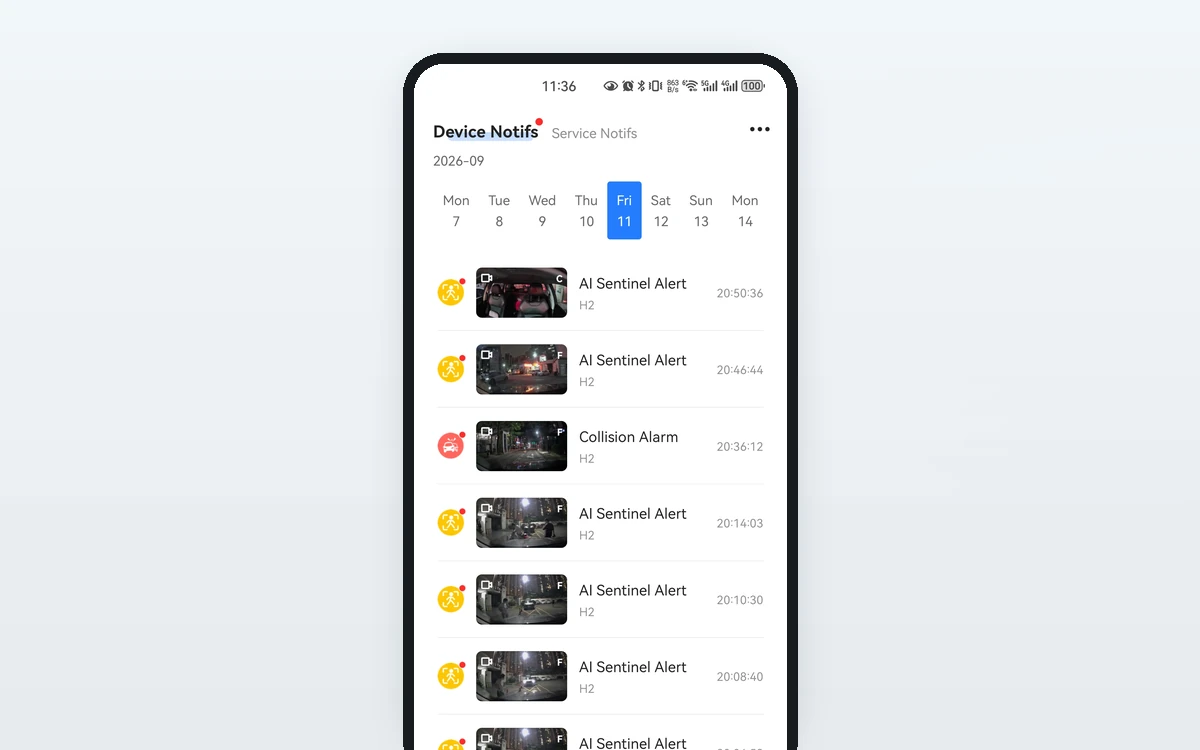
What changes while the car is parked?
While parked, the AI’s job is to decide when the camera should stop conserving and start recording at full quality. In AOV mode the camera records the whole watch at a low frame rate — 1, 0.5 or 0.2 fps, shipping on 1 fps — and switches to normal-frame-rate recording when AI Sentinel detects a supported event. In Standby mode there is no continuous footage at all: the camera sleeps and wakes when the G-sensor feels an impact, then records at full frame rate.
That trade-off is about evidence, not cleverness: AOV gives you the minutes before the event at a low frame rate, while Standby is lighter on the battery and gives you nothing from before the wake-up. Either watch is set for up to 24 hours at a time, and low-voltage protection ends it when battery voltage falls below the threshold you set, so the watch stops rather than drawing the battery down further.
| Parking setting | What is recorded during the quiet hours | What AI Sentinel does | What you give up |
|---|---|---|---|
| AOV (Auto Open Video) | Continuous footage at 1, 0.5 or 0.2 fps (ships on 1 fps) | Switches the recording to normal frame rate when it detects a supported event | The heaviest of the two on the car battery, because something is always being written |
| Standby | Nothing until an impact | Wakes the camera on a G-sensor impact, then records at full frame rate | The footage from before the impact |
| PowerOff | Nothing — the camera is shut down | Nothing; it is not running | Any parked watch at all; this is the off switch, not a monitoring mode |
| Collision sensitivity (applies to both watches) | Unchanged | Off, Low, Mid or High decides how hard a knock counts as an event; ships on Mid | High catches lighter knocks and more non-events; Low does the reverse |
Does any of it need a subscription?
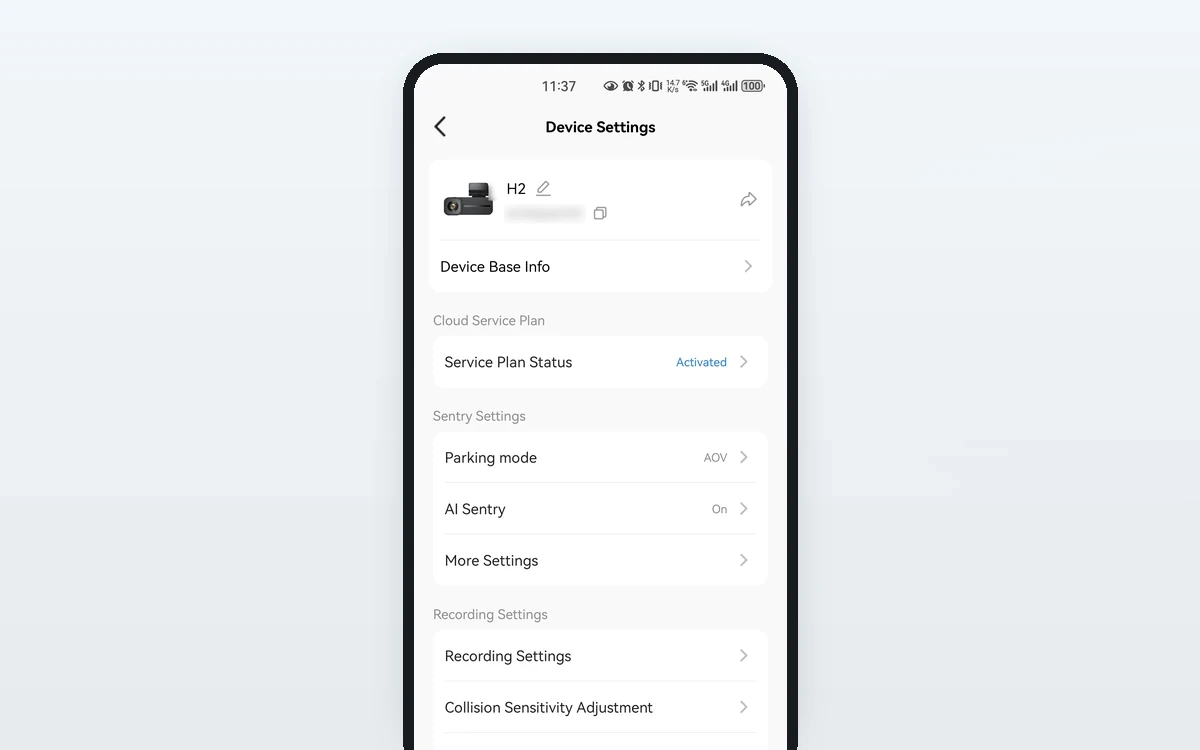
The detection does not; the delivery does. Locking an event clip onto the card happens on the camera, with no plan involved — that part you keep for as long as you own it. Getting a push alert about that event, opening live view, talking through the camera or keeping a cloud copy all need an active plan and cellular coverage where the car is parked.
Plans start at Basic $9.99/month, which includes AI Sentinel notifications, live view, two-way voice and live GPS but no cloud storage — a locked clip exists only on the card. Standard at $19.99/month adds cloud event storage with 7-day retention plus AI Cloud Snap, GPS track history and Video on Map; Premium is $29.99/month, and Standard billed yearly is $199.99. A new camera has 30 days of Standard benefits at no charge that you claim in the app after pairing — they do not start on their own.
| Step in an event | Where the work happens | Published figure or setting | Needs an active plan? |
|---|---|---|---|
| Deciding an event happened | On the camera | 1 TOPS NPU; collision sensitivity Off / Low / Mid / High, ships on Mid | No |
| Locking the clip so the loop cannot overwrite it | On the camera’s microSD card | Loop files of 1, 2 or 3 minutes; 64 GB card included and pre-installed | No |
| Alert arriving on your phone | The camera’s built-in 4G — no SIM card to buy | Requires cellular coverage where the car is parked | Yes — included from Basic $9.99/month |
| Cloud copy of the locked clip | Uploaded from the camera over 4G | 1280×720 at 30 fps; kept 7 days | Yes — Standard $19.99/month or above |
| Full-resolution original | Pulled off the card at the car over Wi-Fi 6 (2.4 + 5 GHz) | No cellular data used | No |
What can’t a dash cam’s AI do?
It cannot add detail the lens and sensor never captured, or promise a usable identification. Our published specification carries no plate-readability claim and no night-vision range figure, and we do not make one: the road camera writes 2K 2560×1440 interpolated from a native 1920×1080 sensor, with hardware HDR, WDR and 3D DNR, and what that resolves at distance depends on light, weather, speed and glass. An AI deciding which file to keep does not change what is in the frame.
It also cannot guarantee that an alert reaches you. The decision is local, but the notification travels over 4G, so no coverage at the parking spot means no alert until coverage returns — the clip is locked on the card either way. Sensitivity cuts both ways: High catches the light knock from the next car’s door and also more things that were not incidents; Low does the opposite. And it only sees what the lenses see — 136.8° diagonal on the road camera, 138° on the cabin camera, and the rear view only with the rear-camera kit, which is an option on the product page rather than a separate product; once it is back in stock an owner can arrange one by emailing support@smartsfweb.com at the same $20.
One expectation worth resetting before you buy: if you want a camera that beeps at you while you drive — lane departure, following distance, drowsiness — that is a different feature set from what AI Sentinel is specified to do, which is event detection and clip triage. Of the connected dash cams we looked at in September 2026, “AI” was used for both jobs and sometimes for neither, so read the spec sheet rather than the badge.
The short version
- On the H2, “AI” means AI Sentinel: software on a 1 TOPS NPU in the camera that decides which events are worth locking out of the loop, and when a parked camera should jump from a low frame rate to a full one.
- It runs on the camera, not on your phone or in the cloud, so detection and locking need no plan and no signal.
- AOV keeps continuous footage at 1, 0.5 or 0.2 fps and escalates on an event; Standby sleeps until an impact and loses the run-up. Either watch is up to 24 hours and ends at the low-voltage cutoff.
- Alerts, live view and cloud copies are the plan’s half of the job: Basic $9.99/month for notifications, Standard $19.99/month for a 7-day cloud copy at 1280×720.
- It will not read a plate for you, promise a night-vision distance, or reach you where there is no coverage. The original full-resolution file is on the card; take it off over Wi-Fi 6.